Move your tree here from another site
Almost every family tree site and program can save your tree as a GEDCOM file (.ged). FamilyTree reads it: people, dates, places, partners, children, notes, occupations and photo links. Some sites give you a .zip; you can import that as it is.
Import the file
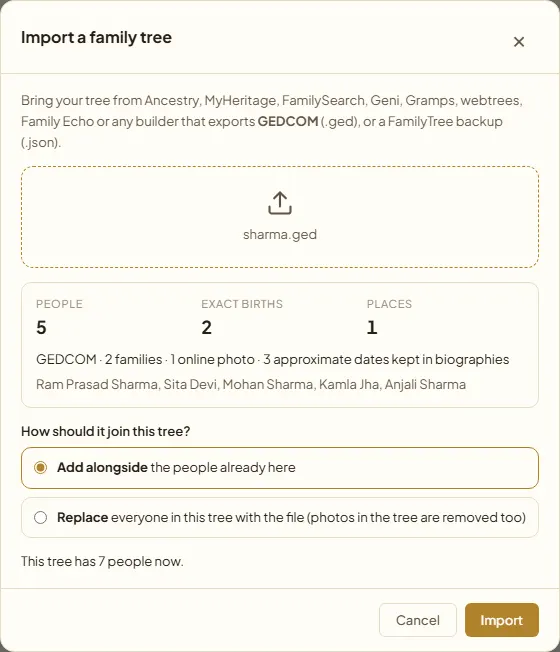
- Open Admin > Members and press Import.
- Choose your
.ged,.zipor FamilyTree backup.json. You see how many people, dates and places it holds, before anything changes. - Choose Add alongside to merge it into the people you already have, or Replace to start the tree over from the file.
Getting the file out of other sites
Menu names change from time to time; if a step does not match, look for Export or Download GEDCOM in the tree's settings.
Ancestry
- On the website (not the app), open Trees and pick your tree.
- From the tree name's menu, choose Tree Settings.
- Under Manage your tree, press Export tree, then Download your GEDCOM file when it is ready.
Free, no subscription needed; only the tree's owner can export. Photos are not included, so save the ones you want from the Media Gallery.
MyHeritage
- Go to Family tree > Manage trees.
- Press Export to GEDCOM next to your tree, then Begin the export.
- MyHeritage emails you a download link when the file is ready.
In the Family Tree Builder desktop program: File > Export GEDCOM.
FamilySearch
FamilySearch does not export its shared Family Tree as GEDCOM. Use a free program that can download from it:
- Install RootsMagic Essentials (free, Windows and Mac).
- Choose Create a New RootsMagic file > Download from an Online Tree > FamilySearch, sign in, pick the starting person and how many generations, and import.
- Then File > Export Data > GEDCOM File.
Geni
Family > Share your tree > GEDCOM Export. Choose blood relatives, ancestors or descendants, set the type to GEDCOM 5.5, and export. Free accounts can export a limited number of profiles.
Findmypast
Family tree > View all trees, press the Export icon next to the tree, then Download tree.
Geneanet
In your tree's Operations > Export, choose GEDCOM and submit. You get a .zip; import it here as it is.
Family Echo
Click anyone, then Download / export this family in the side panel, choose GEDCOM, and download.
WikiTree
From Help: GEDCOM, use the GEDCOM download page: choose ancestors or descendants and enter the WikiTree id of the starting person.
Gramps, RootsMagic, Legacy, Family Tree Maker
- Gramps: Family Trees > Export, choose GEDCOM. Check the privacy and living-people filters, which are remembered from last time.
- RootsMagic: File > Export Data > GEDCOM File.
- Legacy: File > Export to > GEDCOM File, and choose GEDCOM 5.5 (Standard).
- Family Tree Maker: File > Export, choose GEDCOM. Do not password-protect the zip.