Guide · Your data
Choose where your family's data lives
By default your tree is stored in FamilyTree's database, and there is nothing to set up. If you would rather hold the data yourself, each tree can keep its people, photos and tags somewhere you own. Your login and the tree's link stay here either way.
| Home | Cost | Good for |
|---|---|---|
| FamilyTree's database | Free | Most families. Nothing to set up. |
| A Google Sheet | Free | Seeing and editing the data as a spreadsheet. |
| An Airtable base | Free to 1,000 records | People who already use Airtable. |
| Your own MySQL or Postgres | Free tiers exist | Technical families and big trees. |
| A SQLite or JSON file | Free | Self-hosted installs and the desktop app. |
Switching
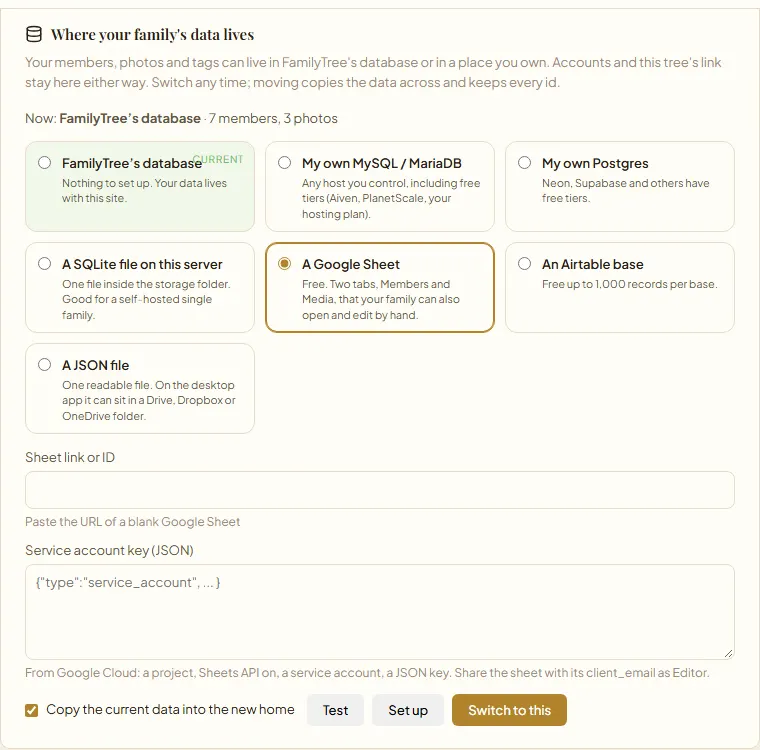
- Open Admin > Tree Settings > Where your family's data lives and pick a home.
- Fill in its details, then press Test. If it is empty, press Set up to create the tables or tabs.
- Keep Copy the current data into the new home ticked and press Switch to this.
Everything is copied with the same ids, so links between people never break. The old copy is left where it was. You can move back at any time the same way.