Guide · Your data
Keep your tree in a Google Sheet
Your tree's people go in a Members tab and photos in a Media tab of a Google Sheet that you own. FamilyTree reads and writes it through a Google service account, a robot account that you share the sheet with. Setting it up takes about ten minutes, once.
1. Make a blank sheet
- Go to sheets.new and name it, for example Sharma family tree.
- Copy its link from the address bar.
2. Make a service account (Google Cloud, free)
- Open Google Cloud Console and create a project, for example familytree. No billing is needed.
- In the search bar, find Google Sheets API and press Enable.
- Go to IAM & Admin > Service Accounts and press Create service account. Any name will do; skip the optional steps.
- Open the new account, go to Keys > Add key > Create new key, choose JSON. A small file downloads.
- Open that file in a text editor and find
client_email. It looks likefamilytree@your-project.iam.gserviceaccount.com.
3. Share the sheet with it
In your sheet, press Share, paste the client_email, choose Editor, untick Notify people and press Share.
4. Connect it
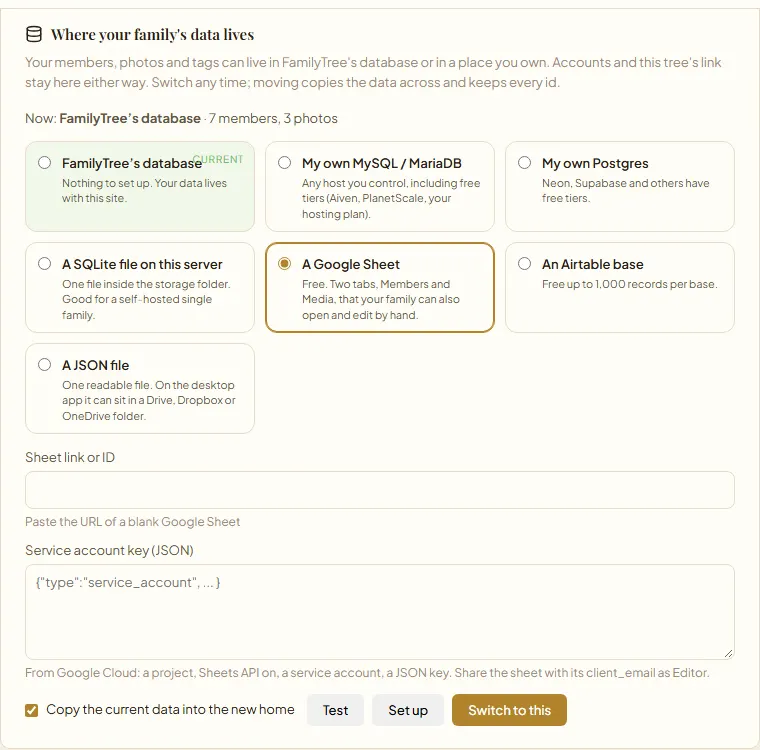
- In Admin > Tree Settings > Where your family's data lives, choose A Google Sheet.
- Paste the sheet's link, and paste the whole contents of the JSON key file into Service account key.
- Press Test, then Set up. The Members and Media tabs appear in your sheet.
- Press Switch to this. Your tree is copied into the sheet.